
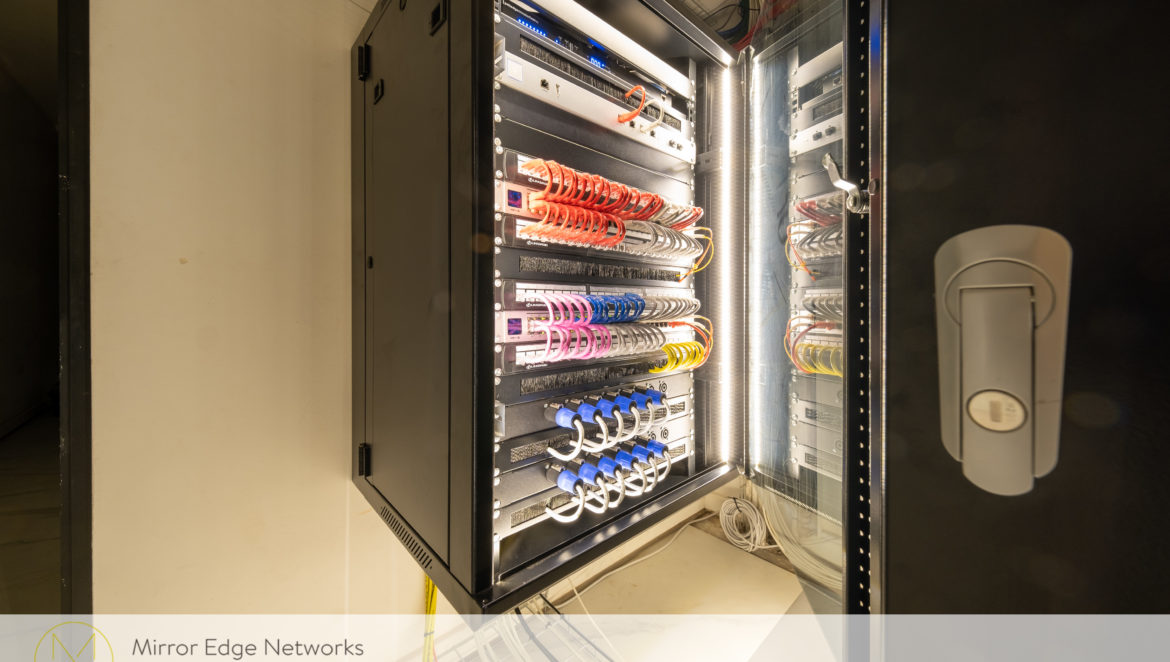

An equipment rack is the part of a connected home most people never see. It may bring together the network, Wi-Fi, television sources, audio, control and security equipment. A good rack is not judged only by how tidy it looks on handover. It should also be safe to work in, straightforward to diagnose and practical to upgrade years later.
List the systems before choosing the rack
Start with the rooms and services the equipment must support. Count the wired data points, wireless access points, television locations, audio zones, control devices and any security equipment within the scope. Record where the sources will live and which rooms need access to them. That system map determines the rack’s role far more reliably than choosing a cabinet by appearance or copying one from another project.
Not every property needs one large central rack. Some systems are better distributed, while others benefit from centralised sources and a single service point. The decision depends on cable routes, room layout and the way the home will be used.
Choose a location that can actually be serviced
A rack needs space for its doors to open, for equipment to be removed and for a technician to reach the connections. It also needs a sensible approach to heat, noise, dust and power. A cupboard that looks convenient on a floor plan may become difficult to maintain if shelves, pipes or finished joinery block access later.
During a build or renovation, decide where cables enter the space and where they can be routed without tight bends or an exposed bundle across the floor. In an existing home, a survey may reveal constraints that call for a different rack position or a smaller, more carefully divided installation.
Make every cable traceable
Structured cabling works best when each run is identified, tested and terminated in a logical place. Patch panels, labels and a record of what each port serves make fault-finding much faster. Colour-coded patch leads can provide a useful visual cue, but colour alone is not documentation: a future technician still needs to know which room and device a connection reaches.
The Camps Bay Control4 server-room project shows this principle at scale. In a five-storey home with television distribution, audio, Wi-Fi, CCTV and Control4, our team traced and rebuilt the equipment environment into three racks with defined network, audio/security and video/control roles. The point of that organisation was dependable operation and easier future service, not simply a better photograph.
Plan power and resilience with the system
Every device adds a power and heat requirement. The design should account for the equipment that runs continuously, the components that may need a controlled restart, and the systems the household most wants to keep available during a brief power interruption. A UPS may support selected network equipment, but its useful runtime depends on the connected load; it does not guarantee that an outside internet connection remains available.
Our network UPS installation is one practical example. Power distribution, backup and any remote-management functions should be specified for the actual installation rather than added as an afterthought.
Leave room for change
Homes change. A new access point, streaming source or control component should not require dismantling an entire rack. Allowing for reasonable spare ports, cable management, ventilation and access can make later work less disruptive. At handover, the installer should be able to explain the system layout and provide enough documentation for someone else to service it responsibly.
At Val de Vie, planning began during construction, so the network, AV cabling and garage rack could be coordinated with the house. Camps Bay demonstrates the other path: an existing technical space can be methodically rebuilt when reliability and serviceability have become problems.
Questions to ask before the room is finished
- Which services will be centralised, and which need equipment in individual rooms?
- Can a technician reach both the equipment and its cabling safely?
- How will each cable, port, power outlet and device be identified?
- What provision is needed for ventilation, backup power and future expansion?
- What testing records and system documentation will be handed over?
A considered rack supports the whole home quietly. Learn more about our home network and Wi-Fi work, or bring us into your project early if the equipment room is still being planned.